A choosin texas emo AI generator for one photo
Make the Choosin Texas emo AI trend without filming on a rooftop or writing choreography. Your photo supplies identity, not the background.
Choosin Texas emo AI trend puts one adult or pet into a nighttime rooftop performance. Choose all-black or your clothes, keep the cowboy hat, and create a fifteen-second video with original cover audio.
Black cowboy hat + all-black reference outfit
Upload one adult or pet photo
Clear face · Waist-up or full body · One subjectJPG, PNG or WebP · up to 10 MB
Video preview
Personal video · 10 credits · Reference cover audio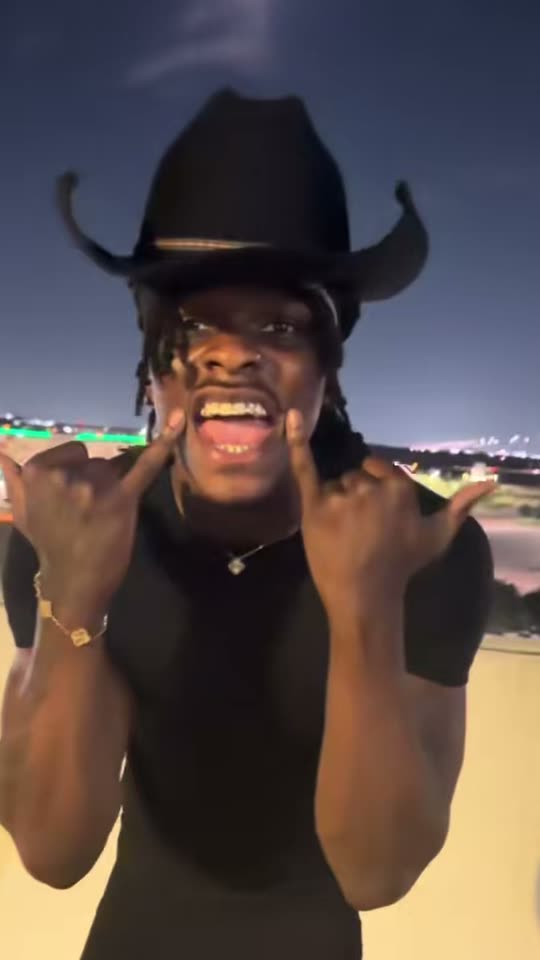
Your photo preview stays in your browser until you generate. Temporary uploaded inputs are removed after the task.
Seedance 2.5. Use a consenting adult or your own pet. Review faces, limbs and hat placement. Original reference audio does not grant music publishing rights. Content rules · Report content
Compare the Choosin Texas emo AI trend references for the outfit, rooftop setting and movement. Generation follows the main clip.
This Choosin Texas emo AI trend reference includes the original emo-cover sound. Unmute to listen.
The ten-second Choosin Texas emo AI trend loop is silent and display-only. It never supplies paid generation.
The Choosin Texas emo AI trend combines country styling with an expressive emo performance: a concrete parking-garage wall, distant lights and a swaying phone camera. Your photo replaces the performer.
Use the Choosin Texas emo AI trend with one consenting adult or your own pet. The choosin texas emo with my face idea replaces the whole subject. Pets retain species and markings with upright movement; details can vary.
The Choosin Texas emo AI trend sample features @kobbapot’s emo cover of Ella Langley’s “Choosin' Texas.” The kobbapot choosin texas and yallternative choosin texas searches describe this musical context.
The wider Choosin Texas emo AI trend routine includes hang-loose signs, wall squat-bounces, a camera lunge and a single-knee ending. Our selected fifteen-second cut stops before the full kneeling finale. Your result follows this cut.
Choose the reference, appearance and credit cost before creating.
Make the Choosin Texas emo AI trend without filming on a rooftop or writing choreography. Your photo supplies identity, not the background.
Customize the Choosin Texas emo AI trend with Trend outfit for all-black clothes or Your outfit for the visible clothing in your photo. Both retain the black cowboy hat. Both preserve pet markings.
Each Choosin Texas emo AI trend video uses ten ReelTada credits. Balance is checked before upload; failures return credits. Packs have no automatic renewal; MP4s restore reference audio. Compare ReelTada credit packs.
Create the Choosin Texas emo AI trend in your browser with one subject and one outfit choice.
For the Choosin Texas emo AI trend, upload one sharp, front-facing adult or pet image. Show clothing clearly, or pets from ears to paws. Use JPG, PNG or WebP up to ten megabytes.
Choose your Choosin Texas emo AI trend outfit, review the free example still and select Generate video. Sign in when prompted. Insufficient credits open the purchase dialog before your image is uploaded.
Preview your Choosin Texas emo AI trend result with sound. Check likeness, paws and hat placement. Download the vertical MP4 for TikTok, Reels or Shorts after checking audio permissions.
A clear face helps the Choosin Texas emo AI trend retain identity.
Upload one adult photo, choose an outfit and select Generate video. The Choosin Texas emo AI trend follows the main clip’s rooftop and gestures. There is no prompt to write or CapCut project to assemble.
Yes. A choosin texas emo pet photo should show one animal, preferably its whole body. The Choosin Texas emo AI trend requests recognizable fur and species with playful upright motion. Review paws afterward.
The Choosin Texas emo AI trend example still and videos are free to view, as is your uploaded-photo preview. The still is the source. Personal videos require sign-in and ten credits.
Choose Your outfit to preserve visible clothing and hair, plus the black cowboy hat. Trend outfit requests the reference’s all-black look. Both Choosin Texas emo AI trend modes keep the same rooftop and sound.
The Choosin Texas emo AI trend restores @kobbapot’s emo cover of Ella Langley’s ?Choosin' Texas? from the main sample’s AAC track. No replacement music. Included audio does not grant publishing rights.
The full routine includes that ending, but our Choosin Texas emo AI trend cut stops beforehand. Expect the selected clip’s hang-loose gestures, wall squat-bounces and camera approach. The silent loop is display-only.
Your Choosin Texas emo AI trend targets approximately fifteen seconds, 9:16 and 2K, with reference sound in an MP4. Frame lengths may vary slightly. No twenty-second option is offered.
One Choosin Texas emo AI trend attempt uses ten shared ReelTada credits. Choose a one-time credit pack. A competitor lists about 100 credits; ReelTada uses its own packs. Confirmed failures return the credits consumed.
The Choosin Texas emo AI trend uses Seedance 2.5 video editing, followed by original-audio restoration. Inspect likeness, mouth timing, limbs and hat placement.
Confirmed Choosin Texas emo AI trend failures show a message and return ten credits. After a connection drop, let the workspace recover the existing task before retrying. Temporary uploaded photos are removed after the task ends.
Check your Choosin Texas emo AI trend and audio permissions before posting. Identify AI edits when appropriate. ReelTada is independent of the performer and song creators; the sample does not establish commercial music rights.
Pick your outfit and preview the reference. Bring your photo to the Choosin Texas emo AI trend with ReelTada.